
高級模板節點
高級模板節點是FlowAI平臺中的一種強大功能,它允許用戶使用Go Template語法根據模板規則動態渲染內容。通過這個節點,您可以創建複雜的文本處理邏輯,實現內容的條件渲染和格式化。
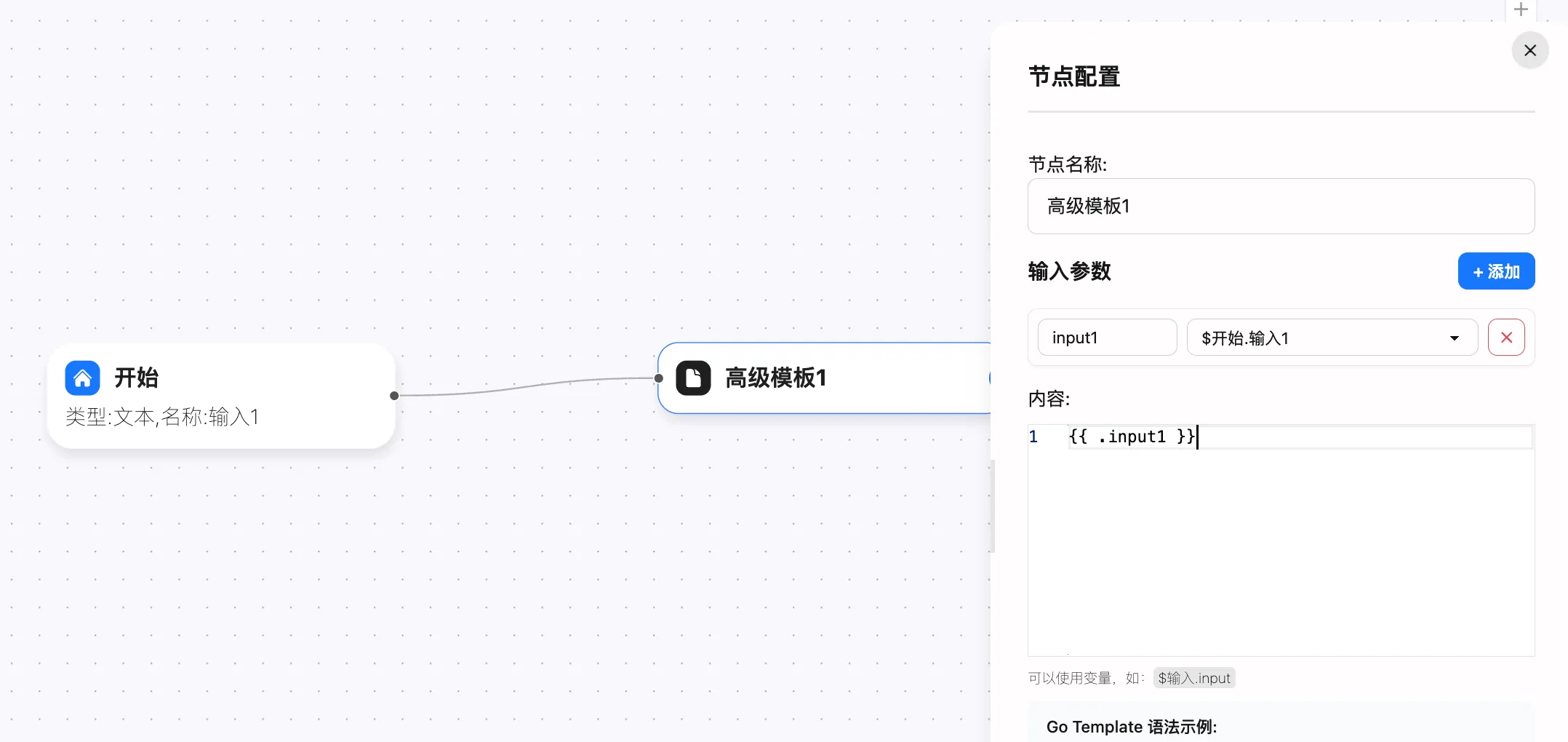
基本用法
高級模板節點遵循Go Template的語法規則,使您能夠:
- 引用變量
- 使用條件語句
- 創建循環
- 應用過濾器和函數
- 處理JSON數據
配置步驟
- 節點命名:為您的模板節點設置一個有意義的名稱,例如”高級模板1”
- 添加輸入參數:點擊”+ 添加”按鈕配置所需的輸入變量
- 編寫模板內容:在內容區域使用Go Template語法編寫您的模板
輸入參數
您可以在節點配置中添加多個輸入參數。這些參數將作為變量在模板中使用:
- 參數名稱應簡潔明瞭,如”input1”
- 參數值可以是文本、數字或從其他節點傳遞的數據
- 在工作流中,可以通過類似
$開始.輸入1這樣的方式引用其他節點的輸出作為輸入
Go Template語法示例
變量引用
{{ .varName }}示例:使用{{ .input1 }}可以引用名為”input1”的輸入參數
條件語句
{{if .condition}}...{{else}}...{{ end }}實際示例:根據用戶情緒生成不同回覆
{{if eq .mood "happy"}} 很高興看到您今天心情不錯!我們為您推薦以下活動: - 戶外野餐 - 與朋友聚會 - 嘗試新的愛好{{else if eq .mood "tired"}} 看起來您需要休息。以下是一些放鬆建議: - 冥想15分鐘 - 喝杯溫熱的花草茶 - 早點休息{{else}} 感謝您的反饋!我們隨時為您提供幫助。{{ end }}循環遍歷
{{range .items}}...{{ end }}實際示例:生成待辦事項列表
# 今日待辦事項
{{range .todoItems}}## {{.title}}- 優先級: {{.priority}}- 截止日期: {{.dueDate}}- 描述: {{.description}}
{{end}}
管道操作
{{ .value | function1 | function2 }}實際示例:格式化用戶輸入
原始輸入: {{ .userInput }}格式化後: {{ .userInput | trim | lower }}內置函數
高級模板節點提供了豐富的內置函數,可以幫助您處理各種數據轉換和操作需求:
JSON處理函數
| 函數 | 描述 | 示例 |
|---|---|---|
json_parse | 將JSON字符串解析為對象 | {{ $data := json_parse .jsonString }}{{ $data.name }} |
json_stringify | 將對象轉換為JSON字符串 | {{ $obj := dict "name" "張三" "age" 30 }}{{ json_stringify $obj }} |
實際示例:處理API返回的JSON數據
{{$apiResponse := json_parse .apiResult}}
# 用戶資料
- 姓名: {{$apiResponse.user.name}}- 郵箱: {{$apiResponse.user.email}}- 會員等級: {{$apiResponse.user.membershipLevel}}
## 最近訂單{{range $apiResponse.user.orders}}- 訂單號: {{.id}} - 金額: {{.amount}}元 - 狀態: {{.status}}{{end}}
字符串處理函數
| 函數 | 描述 | 示例 |
|---|---|---|
upper | 轉換為大寫 | {{ .text | upper }} |
lower | 轉換為小寫 | {{ .text | lower }} |
trim | 去除兩端空格 | {{ .text | trim }} |
trim_left | 去除左側空格 | {{ .text | trim_left }} |
replace | 替換字符串 | {{ replace .text "舊文本" "新文本" }} |
split | 分割字符串為數組 | {{ $arr := split .text "," }} |
join | 將數組連接為字符串 | {{ join .tags "、" }} |
contains | 檢查是否包含子串 | {{ if contains .text "關鍵詞" }}包含關鍵詞{{ end }} |
has_prefix | 檢查是否以指定前綴開始 | {{ if has_prefix .code "A" }}A類產品{{ end }} |
has_suffix | 檢查是否以指定後綴結束 | {{ if has_suffix .email ".com" }}國際郵箱{{ end }} |
實際示例:格式化客戶反饋
{{$keywords := split .feedbackTags ","}}
# 客戶反饋分析
原始反饋: {{.feedback}}格式化反饋: {{replace (lower .feedback) "不滿意" "需要改進"}}
## 關鍵標籤{{range $keywords}}- {{. | trim | upper}}{{end}}
## 情感分析{{if contains (lower .feedback) "滿意"}}積極反饋 ✓{{else if contains (lower .feedback) "失望"}}消極反饋 ✗{{else}}中性反饋 ○{{end}}
數學計算函數
| 函數 | 描述 | 示例 |
|---|---|---|
add | 加法 | {{ add .num1 .num2 }} |
sub | 減法 | {{ sub .total .discount }} |
mul | 乘法 | {{ mul .price .quantity }} |
div | 除法 | {{ div .total .count }} |
mod | 取模 | {{ mod .number 2 }} |
實際示例:購物車計算
# 購物清單
{{range .items}}- {{.name}}: {{.price}}元 x {{.quantity}} = {{mul .price .quantity}}元{{end}}
## 費用匯總- 商品總價: {{.subtotal}}元- 折扣: {{.discount}}元- 運費: {{.shipping}}元
## 應付金額總計: {{add (sub .subtotal .discount) .shipping}}元
{{if gt .discount 0}}您節省了: {{.discount}}元!{{end}}
數組/切片操作函數
| 函數 | 描述 | 示例 |
|---|---|---|
first | 獲取數組第一個元素 | {{ first .items }} |
last | 獲取數組最後一個元素 | {{ last .items }} |
length | 獲取長度 | {{ length .items }} |
實際示例:處理調查結果
{{$responses := json_parse .surveyResponses}}
# 調查結果分析
- 總回覆數: {{length $responses}}- 第一位回覆者: {{(first $responses).name}}- 最後一位回覆者: {{(last $responses).name}}
## 詳細回覆{{range $index, $resp := $responses}}{{add $index 1}}. {{$resp.name}} ({{$resp.age}}歲)   問題1: {{$resp.q1}}   問題2: {{$resp.q2}}
{{end}}
高級應用場景
場景一:智能客服回覆生成
{{$customerData := json_parse .customerInfo}}
尊敬的{{$customerData.name}}{{if eq $customerData.vipLevel "gold"}}尊貴的金卡會員{{end}}:
感謝您關於"{{.issueTitle}}"的諮詢。
{{if contains (lower .issueDescription) "退款"}}關於您的退款請求,我們將在{{add 1 2}}個工作日內處理。您的訂單號{{$customerData.lastOrder.id}}已被記錄。{{else if contains (lower .issueDescription) "配送"}}您的包裹正在配送中,預計{{.estimatedDelivery}}送達。運單號:{{$customerData.lastOrder.trackingNumber}}{{else}}我們已收到您的反饋,專業客服將盡快與您聯繫。{{end}}
{{if gt (length $customerData.pendingOrders) 0}}您目前有{{length $customerData.pendingOrders}}個待處理訂單:{{range $customerData.pendingOrders}}- 訂單號:{{.id}} | 狀態:{{.status}} | 金額:{{.amount}}元{{end}}{{end}}
祝您生活愉快!{{if has_suffix $customerData.name "女士"}}女士{{else}}先生{{end}}
場景二:數據報告生成
{{$salesData := json_parse .monthlySales}}{{$totalSales := 0}}{{$bestMonth := ""}}{{$bestSales := 0}}
# {{.year}}年銷售報告
## 月度銷售額{{range $month, $amount := $salesData}}- {{$month}}: {{$amount}}元{{$totalSales = add $totalSales $amount}}{{if gt $amount $bestSales}}  {{$bestSales = $amount}}  {{$bestMonth = $month}}{{end}}{{end}}
## 銷售統計- 年度總銷售額: {{$totalSales}}元- 月平均銷售額: {{div $totalSales 12}}元- 銷售最佳月份: {{$bestMonth}} ({{$bestSales}}元)- 同比增長: {{if gt .growthRate 0}}↑{{else}}↓{{end}}{{.growthRate}}%
## 產品類別分析{{range .categories}}### {{.name}}- 銷售額: {{.sales}}元 (佔比: {{mul (div .sales $totalSales) 100}}%)- 暢銷產品: {{.topProduct}}{{end}}
場景三:個性化郵件模板
{{$user := json_parse .userData}}
主題: {{if eq .emailType "welcome"}}歡迎加入{{.companyName}}{{else if eq .emailType "birthday"}}生日快樂,{{$user.name}}!{{else}}{{.companyName}}最新資訊{{end}}
{{if eq .emailType "welcome"}}親愛的{{$user.name}},
歡迎加入{{.companyName}}大家庭!我們非常高興您成為我們的一員。
以下是您的賬戶信息:- 用戶名: {{$user.username}}- 會員等級: {{$user.membershipLevel}}- 註冊日期: {{$user.registrationDate}}
{{else if eq .emailType "birthday"}}親愛的{{$user.name}},
祝您{{$user.age}}歲生日快樂!
為慶祝您的特殊日子,我們為您準備了{{.birthdayOffer}}優惠券,有效期至{{.offerExpiry}}。
{{else}}親愛的{{$user.name}},
感謝您一直以來對{{.companyName}}的支持。
以下是我們的最新資訊:{{range .newsItems}}## {{.title}}{{.content}}
{{end}}{{end}}
祝好,{{.companyName}}團隊
使用輸出
高級模板節點的輸出可以在工作流中的後續節點中使用:
- 輸出引用格式:
$高級模板1.template - 您可以將這個輸出連接到其他節點作為輸入
- 模板處理後的結果可以直接用於郵件發送、API請求或其他操作節點
最佳實踐
- 模塊化設計:將複雜模板拆分為多個小模板,提高可維護性
- 預處理數據:在模板前使用JSON處理節點整理數據結構
- 測試驗證:使用測試數據驗證模板輸出,確保格式正確
- 註釋說明:在複雜模板中添加註釋,提高可讀性
- 錯誤處理:使用條件語句處理可能的空值或異常情況
通過合理使用高級模板節點,您可以顯著增強您的工作流自動化能力,實現更加靈活和強大的內容處理功能。無論是生成報告、個性化通信還是數據轉換,高級模板節點都能滿足您的需求。
定製服務
官方團隊為您量身定製專業的自動化解決方案